
WordPress Site Migration Made Simple. Move Your Site to StellarSites in Just a Few Clicks.
Moving your existing WordPress site to StellarSites is now simpler than ever with our new, integrated migration tool. Significantly reduce complexity and gain peace of mind as your site transitions to our high-performance platform, ready to shine.
By: Sarah Ulmer · Published: August 26, 2025 · Updated: August 26, 2025
Moving your WordPress site to StellarSites has never been easier. Forget complicated plugins, zip files, or manual database edits; our built-in migration tool guides you step by step, so your site is safely transferred without the stress. Whether you’re switching hosts or launching a new project, StellarSites takes care of the hard work, so you can focus on your business.
Why Moving a WordPress Site Is Hard (and How We Fix It)
Migrating a WordPress site traditionally involves a lot of technical steps: copying files, moving databases, updating URLs, and more. It’s easy to make mistakes that break your site or cause downtime.
StellarSites makes migrating your WordPress site simple and stress-free. You don’t need any coding or technical experience. The tool guides you with clear instructions and handles everything automatically, so your live site stays intact and secure throughout the process.
Fast, safe, and effortless, StellarSites takes the hard work off your plate.
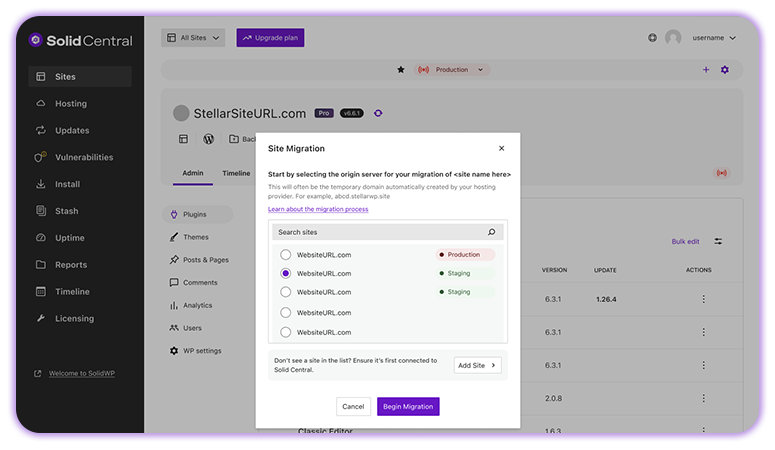
StellarSites’ Built-In Migration Tool Explained
Our migration tool is built for simplicity and reliability. You can move sites from most major hosting providers with just a few clicks. Here’s what it does for you:
- Connect your old site safely: Enter your site details once, and the tool handles the rest.
- Automatic file and database transfer: No zip files, no manual edits.
- Real-time progress tracking: Watch your site move and get notified of any issues.
- Optimized performance: Your site is ready to run smoothly on StellarSites from the start.
Step-by-Step: How to Move Your WordPress Site to StellarSites
- Open your StellarSites dashboard and go to the “Migration” tab.
- Enter your old site’s domain and access credentials.
- Follow the guided prompts to start the transfer.
- Monitor progress and get alerts if any issues arise.
- Once complete, your site is live and fully optimized on StellarSites.
With everything handled for you, moving your site has never been easier. As long as your current host provides domain mapping and access credentials, StellarSites takes care of the rest.
Make Your Move to StellarSites Today
Migrating your site doesn’t have to be technical or stressful. With StellarSites, you can move your WordPress site with just a few guided steps. No plugins, no downtime, and no complicated commands. Our tool even helps with DNS updates automatically, so your new site is ready to go live without the hassle.
Ready to switch? Start your effortless migration to StellarSites now.


Stay Updated
Stay informed about the latest StellarPay updates, new features, and improvements. Subscribe to our newsletter for expert tips to help your clients succeed with their eCommerce websites.

