


Stripe supports a wide variety of payment methods, all of which are available to you via StellarPay. Payment methods and currency support is geography specific though.
To best understand what payment methods are available to you, check with this Stripe Guide to Payment Methods.
Here is a quick overview of the payment methods available to you (depending on your country) and any notes or caveats with these options.
This is a chart provided by Stripe to showcase payment method availability by country:
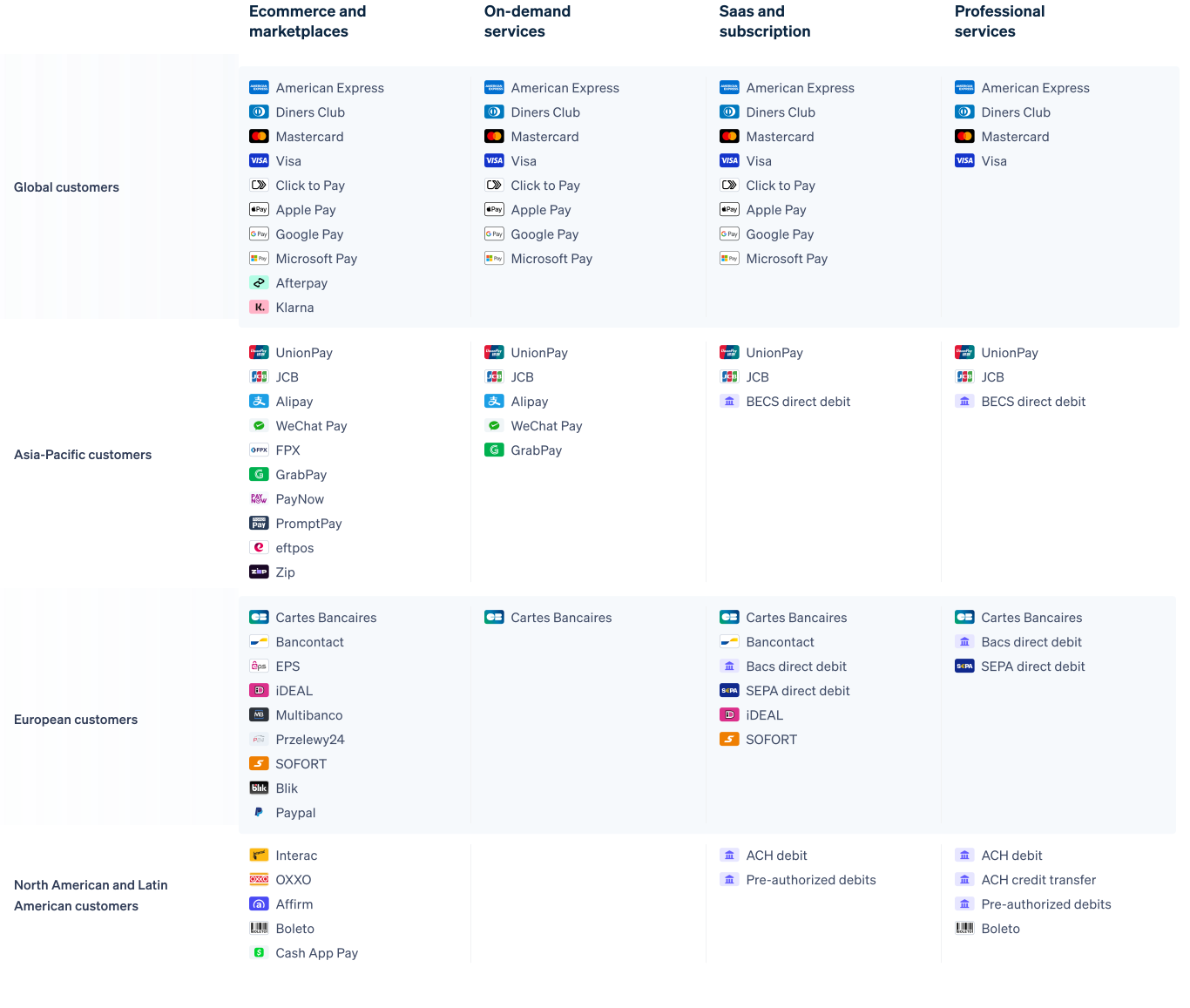
StellarPay Payment Methods available via Stripe #
Payment methods that Stripe provides are categorized in StellarPay settings as follows:
- Cards
- Wallets
- Bank Redirects
- Bank Debits
- Buy Now, Pay Later
NOTE
Stripe supports these gateways, but for many of them you will need to sign-up for your own account with them and connect that account to your Stripe account. Please read the details and requirements
Cards #
By default, Stripe provides two credit card processors:
- Credit Cards (Stripe documentation on Credit Cards)– Accept Visa, Mastercard, American Express, Discover, Diners Club, JCB, and China UnionPay payments from customers worldwide.
- Cartes Bancaires (Stripe documentation on Cartes Bancaires) — Cartes Bancaires is France’s local card network.
Wallets #
These are the digital wallet payment methods Stripe makes available with StellarPay:
- Apple Pay (Stripe documentation on Apple Pay) — Apple Pay enables frictionless card payments and eliminates the need to manually type card or shipping details.
- Google Pay (Stripe documentation on Google Pay) — Google Pay allows customers to make payments in your app or website using any credit or debit card saved to their Google Account, including those from Google Play, YouTube, Chrome, or an Android device.
Before you enable Google Pay as a payment method using Stripe, please review the Google Pay API Terms of Service and related Privacy Policy to understand what additional services Google may use on your site. Enabling Google Pay may mean, among other things, that Google uses data collected for analytics. - Link (Stripe documentation on Link) — Link autofills your customers’ payment information to create an easy and secure checkout experience, increasing conversion rates by over 7%.
Bank Redirects #
Bank Redirects take the customer off your site to complete their purchase via authentication with their bank on the bank website. Once payment is finalized, the customer can be redirected back to your website for purchase confirmation.
These are popular in European countries. These are the bank redirect options available in StellarPay via Stripe.
- Bancontact (Stripe documentation for Bancontact) — Accept payments using Bancontact, Belgium’s most popular payment method.
- BLIK (Stripe documentation for BLIK) — BLIK enables customers in Poland to pay directly via online payouts from their bank account. Customers enter 6-digit code from their banking application into the payment collection form. The bank will send a push notification to your customer’s mobile phone asking to authorize the payment inside their banking application.
- EPS (Stripe documentation for EPS) — EPS enables customers in Austria to pay directly via online payouts from their bank account. Customers are redirected to their bank’s payment page to log in and approve payments.
- giropay (Stripe documentation for giropay) — giropay enables customers in Germany to pay directly via online payouts from their bank account. Customers are redirected to their bank’s payment page to log in and approve payments. As of June 30, 2024, Giropay won’t be accepting new businesses or payments.
- iDeal (Stripe documentation for iDeal) — iDEAL enables customers in the Netherlands to pay directly via online payouts from their bank account. Customers are redirected to their bank’s payment page to log in and approve payments.
- Przelewy24 (Stripe documentation for Przelewy24) — Przelewy24 (P24) enables customers in Poland to pay directly via online payouts from their bank account. Customers are redirected to their bank’s payment page to log in and approve payments.
- Sofort (Stripe documentation for Sofort) — Sofort enables customers in Austria, Belgium, Germany, Italy, Netherlands and Spain to pay via direct online payouts from their bank accounts. Customers log into Sofort’s payment page to approve payments.
Bank Debits #
- Bacs Direct Debit (Stripe documentation for Bacs Direct Debit) — Bacs Direct Debit enables customers in the UK to pay by providing their bank account details. Customers must accept a mandate authorizing you to debit their account.
Buy Now, Pay Later #
- Affirm (Stripe documentation for Affirm) — Affirm is a ‘Buy Now, Pay Later’ method that enables customers in the US and Canada to pay in installments / monthly payments.
- Afterpay / Clearpay (Stripe documentation for Afterpay/Clearpay) — Afterpay Clearpay is a buy now pay later method that enables customers in Australia, Canada, New Zealand, the UK, and the US to pay in 4 installments.
- Klarna (Stripe documentation for Klarna) — Klarna is a buy now pay later method that enables customers in Europe, Canada, Australia, New Zealand, the UK, and the US to pay now, later, or in installments, depending on the country.
